Security Ready | Vulnerability scanning for your company's website and servers
Vulnerability scans for your servers: from once a year to every day (automatically).
We scan from the outside, and also look inside your servers and PCs (Windows and Linux). Using open-source scanning tools trusted worldwide, we check regularly and send you only the problems that apply to your servers, together with what to do about them, in plain language.
Matched against a worldwide set of checks(release of Oct 23)
Automatic checks from the outside
Internal scans of Windows and Linux
New vulnerability checks are added all the time. We load the latest ones before every scan.
Critical
0
High
2
Medium
3
Low
8
HighA private settings file (.env) is visible to anyone
shop.example.com
To fix: change your web server settings so .env can't be downloaded
HighYour certificate expires soon (9 days left)
www.example.com
- 14,104
- Checks for known vulnerabilities and misconfigurations(release of Oct 23)
- 5 areas
- Email, encryption, website, ports and known vulnerabilities
- Every scan
- Starts by loading the latest checks
- A to E
- PDF report with an overall grade
Is this enough?
Most attacks on small businesses start with weak spots visible from the outside
Here is where attacks actually come in, according to Japanese government research, next to what Security Ready checks every week.
Japan's National Police Agency: how ransomware got in (first half of 2025, 45 cases)
Over 80% came in through weak spots in entry points visible from the internet (VPN devices and remote desktop). Security Ready checks every week for open entry points and known vulnerabilities in the software running on them, and on the day a critical vulnerability is published, it checks that same day.
IPA (Japan's Information-technology Promotion Agency): main weak spots found when scanning 126 small businesses from the outside
| Weak spot found | Security Ready |
|---|---|
| Unencrypted connections (HTTP, FTP) | ○ |
| Expired or self-signed certificates | ○ |
| Databases visible from the outside | ○ |
| Git contents or settings files visible | ○ |
| Known vulnerabilities (OpenSSH, etc.) | ○ |
| Missing security headers | ○ |
| Problems with SPF or DMARC | ○ |
| Cookies without security flags | ○ |
| VPN or admin login pages visible | ○ |
| DNS zone transfer misconfiguration | △ Coming |
△ means we are still building this out. What we can't do is listed honestly under "What we can and can't do".
The same tools the experts use
nmap, nuclei, OWASP ZAP and testssl.sh: open-source tools used by security professionals worldwide, with new checks added every time a new weak spot is published.
14,104 checks
Published vulnerabilities, files that should never be visible, old encryption, doors left open, and fake-email settings, all checked together.
Honest about the gaps
Deep testing of screens behind a login, and loopholes in business processes, need a human tester. Combining us with a human test once a year gives you peace of mind.
Sources (in Japanese): National Police Agency, "Cyberspace threats in the first half of 2025" (as published by Nagasaki Prefectural Police) / IPA, summary of the report on ASM assessments and case studies (published March 2026)
Does this sound familiar?
No one is in charge of security
You have a website and servers, but no one checks whether they are safe. You don't know where to start.
Security testing is expensive, so it happens once a year at best
A test by a security firm typically costs thousands to tens of thousands of US dollars each time. Any new vulnerabilities published in between go unnoticed.
The results are full of jargon
Even when you get the report, you can't tell which problems are really dangerous or what you are supposed to do.
Security Ready fills the gap between tests by being affordable, frequent and easy to understand.
Vulnerability scanning today
Protection is shifting from once a year to every day
01
Around 40,000 vulnerabilities are now published every year
The number of published vulnerabilities grows every year, with about 100 new ones found every day. It's no longer realistic for a person to check them all each time.
With Security Ready: Twice a day (6:00 and 18:00 JST), we automatically pull new vulnerabilities from public databases and compare them with how your servers are set up.
02
The time from disclosure to attack is getting shorter
It's not unusual for attacks to start within days of a vulnerability being published. A once-a-year test won't catch vulnerabilities that appear in between.
With Security Ready: Each time new checks come out, we scan for just those. Because the load on your server is small, we can do this often.
03
From "a test once a year" to "always watching"
ASM (attack surface management), which keeps watch over the entry points attackers can see from outside, is spreading. Japan's Ministry of Economy, Trade and Industry (METI) published an introduction guide for it in 2023.
With Security Ready: We automatically find subdomains and spot changes in your open ports and software, so we also watch entry points that appeared without you noticing.
04
It's not just big companies that get targeted
In "10 Major Security Threats", the annual list by IPA (Japan's Information-technology Promotion Agency), attacks that go through business partners and contractors rank near the top. Small businesses and group companies often become the weak link.
With Security Ready: You can manage each company separately, and a head office can see the number of unfixed problems across the group in one list. Even companies with no security person get clear to-dos in plain language.
Compared with other options
What we're good at as a scanning tool, and what we can't do
We include the rows where Security Ready loses, too. ○ Yes △ Partly × No
| Testing by people | Automated website scanners | Non-Japanese continuous monitoring services | Security Ready | |
|---|---|---|---|---|
| Typical cost | Thousands to tens of thousands of US dollars per test | Tens to hundreds of US dollars per month | Hundreds of US dollars per month and up | From USD 19/month (first server). First scan free |
| How often | About once a year | Whenever you need | All the time | Daily checks and matching + scans at times you choose + automatic checks when a relevant vulnerability appears |
| Keeps up with newly published vulnerabilities | × | △ | ○ | ○ |
| Shows only what applies to you | ○ Chosen by a person | △ | △ | ○ |
| What to do, in plain language | ○ | △ | × Technical English | ○ |
| Permission records, and automatic stop outside the allowed scope | ○ By contract | △ | △ | ○ |
| Manage several companies separately | × | △ | ○ | ○ |
| Exposed files, open doors, certificates and email settings | ○ | ○ | ○ | ○ |
| Actually trying attacks through input forms (such as SQL injection) | ○ | ○ | △ | △ Only with written consent |
| Internal scan (software and updates inside servers and PCs) | ○ Often at extra cost | △ | × | ○ Windows and Linux |
| Loopholes in business processes and access rights | ○ | × | × | × |
The other columns show general trends for each type of product or service. Individual products differ.
Features
Only what you need to see, in words you understand
30-second quick check
Just enter your domain. We score the weak spots anyone can see from the outside, show you how an attacker would most likely come in, and tell you what to fix today. No sign-up needed.
For WordPress, just install a plugin
Install our plugin and we check every day whether WordPress itself, your plugins, your themes and PHP are out of date. We also flag risky plugins that are no longer maintained. Works on shared hosting too.
Paperwork for your business partners, in one click
Create a PDF of your security measures that follows the 26 items of ★3 in SCS, the supply-chain security evaluation scheme being set up by Japan's Ministry of Economy, Trade and Industry (METI) and IPA. Anything our scans can tell (outdated software, unfixed vulnerabilities, exposed entry points) is filled in for you.
Fix it, then confirm right away
For each finding we show how to fix it on your setup. Once you've fixed it, press "I fixed it, check again". We re-scan just that problem and keep a record that it's fixed.
Find entry points you didn't know about
Every morning we search public certificate records for forgotten subdomains, such as old campaign sites or test servers. If one points to something that no longer exists and could be taken over, we tell you right away.
A score compared with others in your industry
We turn the weight of your unfixed problems into a score out of 100, and show how you rank within your industry and overall. (We never show anyone other companies' names or scores.)
We check from the outside and the inside
Besides scanning from the internet, a read-only inspection program looks inside your servers and PCs (Windows and Linux). It checks for outdated software, whether the firewall and antivirus are on, your password rules, and even backdoors planted on your site (signs of a break-in).
Only what applies to you
We don't list every vulnerability in the world. We only show problems that match how your servers are set up, most serious first.
"What to do" in plain language
Each finding comes with a short note on how to fix it. Severity has four levels: Critical, High, Medium and Low.
Frequent, lightweight scans of what changed
We only run checks for newly published vulnerabilities and look at what changed since last time. This puts very little load on your server, so we can scan often.
Five areas, checked automatically
Protection against fake emails in your name, encrypted connections (HTTPS), basic website settings, your server's open doors (ports), and known published weak spots (vulnerabilities). We use the standard scanning tools that security professionals use.
A profile for every server
Keep each server's setup (operating system, web server, database and their versions), scan history, permission records and the person in charge together in one place.
Reports as PDFs
Get a PDF report per server or per company in one click. Use it as-is to brief your team or report to your clients.
How it works
Four steps to start monitoring
- 1
Confirm you may scan the site
Choose whether you are the site's administrator or an agent with the administrator's permission (such as a web agency), and tick the box to accept responsibility. No DNS changes needed.
- 2
Record what you're allowed to scan
Record what may be checked, for how long, at what times, and the maximum number of requests per second. Anything outside that is stopped automatically.
- 3
We scan automatically
We load the latest checks before every scan. If something changed since last time, more detailed checks are added automatically.
- 4
You only hear about what applies to you
Your screen shows only the problems that affect your servers, each with what to do. You can download the report as a PDF.
Emergency response
When a vulnerability affecting your servers is published, we tell you within half a day
No need to wait for the next scheduled scan. We pull in new vulnerabilities twice a day (6:00 and 18:00 JST), pick out only the ones that match your servers' setup (operating system, software and versions), and alert you right away.
- 1
Published
A new vulnerability is made public
A critical vulnerability is added to a public database.
- 2
6:00 and 18:00 JST
We compare it with your servers
Twice a day we pull in new vulnerabilities and check whether they affect the operating systems, software and versions on record for your servers.
- 3
As soon as it matches
We alert you by email, Slack and more
We tell you in plain language which server is at risk, what the problem is, and how to fix it.
- 4
During your allowed hours
We scan for just that vulnerability
If you turn on automatic scans, we check from the outside whether your server is really affected.
A typical scheduled scan
Runs the same checks at the same time, and that's it. You can't see when a new vulnerability was added to the checks.
Security Ready
Shows on screen when new vulnerabilities were last pulled in. When one that affects you appears, we check for that vulnerability specifically and send you the result and what to do.
Updated daily
Newly published critical vulnerabilities
Pulled automatically from a public database twice a day (6:00 and 18:00 JST) and compared with the setup of registered servers.
Last updated Nov 11, 2026, 18:01 JST
- Critical
Critical vulnerability in AVideo
Published 2026-11-11 · CVE-2026-126542
- Critical
Critical vulnerability in Basel Post Types
Published 2026-11-11 · CVE-2026-89324
- Critical
Critical vulnerability in Adobe Connect
Published 2026-11-11 · CVE-2026-121904
- Critical
Critical vulnerability in Adobe Connect
Published 2026-11-11 · CVE-2026-121355
- Critical
Critical vulnerability in Windows 10 Version 1809, Windows 10 Version 21H2 and others
Published 2026-11-11 · CVE-2026-95962
- Critical
Critical vulnerability in Windows Server 2016, Windows Server 2016 (Server Core installation) and others
Published 2026-11-11 · CVE-2026-88243
- Critical
Critical vulnerability in Microsoft SharePoint Server Subscription Edition
Published 2026-11-11 · CVE-2026-80095
- Critical
Critical vulnerability in Microsoft GDK
Published 2026-11-11 · CVE-2026-66801
Source: NVD (U.S. National Institute of Standards and Technology) and CVE. This product uses data from the NVD API but is not endorsed or certified by the NVD.
What we check
Websites, servers and WordPress, checked across five areas
"Outside view only" puts almost no load on your server. "Standard" checks run only during the hours agreed with you.
| Area | What you learn | How we check |
|---|---|---|
| Protection against fake emails | Whether you have the settings that stop fake emails sent in your company's name (SPF and DMARC), and whether your address book (DNS) has been changed without your knowledge | Outside view only |
| Encrypted connections (HTTPS) | Whether the ID card behind the padlock (your certificate) has expired, or whether old, easy-to-break encryption methods are still enabled | Outside view only |
| Basic website settings | Which software and versions you run, the settings that tell browsers how to handle your site safely, and how login information is stored in the browser | Outside view only |
| Your server's open doors (ports) | Whether doors that should never face the internet, such as your database or admin access, are open | Standard |
| Published weak spots (vulnerabilities) and misconfigurations | Whether vulnerabilities published worldwide affect you, and whether files or admin pages that should be hidden are visible | Standard |
| Internal scan (inside your servers and PCs) | The versions of all software installed on Windows and Linux, whether Windows Update has stopped, whether unsupported Windows or Office is still in use, and whether remote-control software is installed (using a read-only inspection program) | Runs inside |
We use standard open-source scanning tools (their code is public) that security professionals around the world rely on: nmap, nuclei, testssl.sh, httpx and more.
When we find a weak spot
We don't stop at finding it
- 1
It shows on your screen
Findings are listed most serious first, each with what to do.
- 2
Serious ones are sent right away
Critical and High findings are sent instantly to Slack, Teams or Discord.
- 3
Fix it, or pass it on
The "what to do" text can be forwarded as-is to your web agency or hosting company. If you have a reason not to fix something, you can write it down and mark it "No action needed".
- 4
We confirm the fix automatically
If a problem is gone at the next scan or the twice-daily check, it moves to "Fixed" and is noted in the report. Serious problems left unfixed get a reminder every 7 days.
Security Ready never changes anything on your servers.
Reports
One PDF to brief your team or report to your clients
- ✓Overall grade (A to E) and the number of findings at each severity
- ✓List of findings, each with what to do
- ✓What was fixed during the period, and changes to your servers
- ✓How we scanned, and what this report can't cover
- ✓Available per server and per company
The sample is a real scan of our own test server, which we deliberately left with weak spots. Only the company name, server names and addresses have been replaced with made-up ones. Reports are currently produced in Japanese.
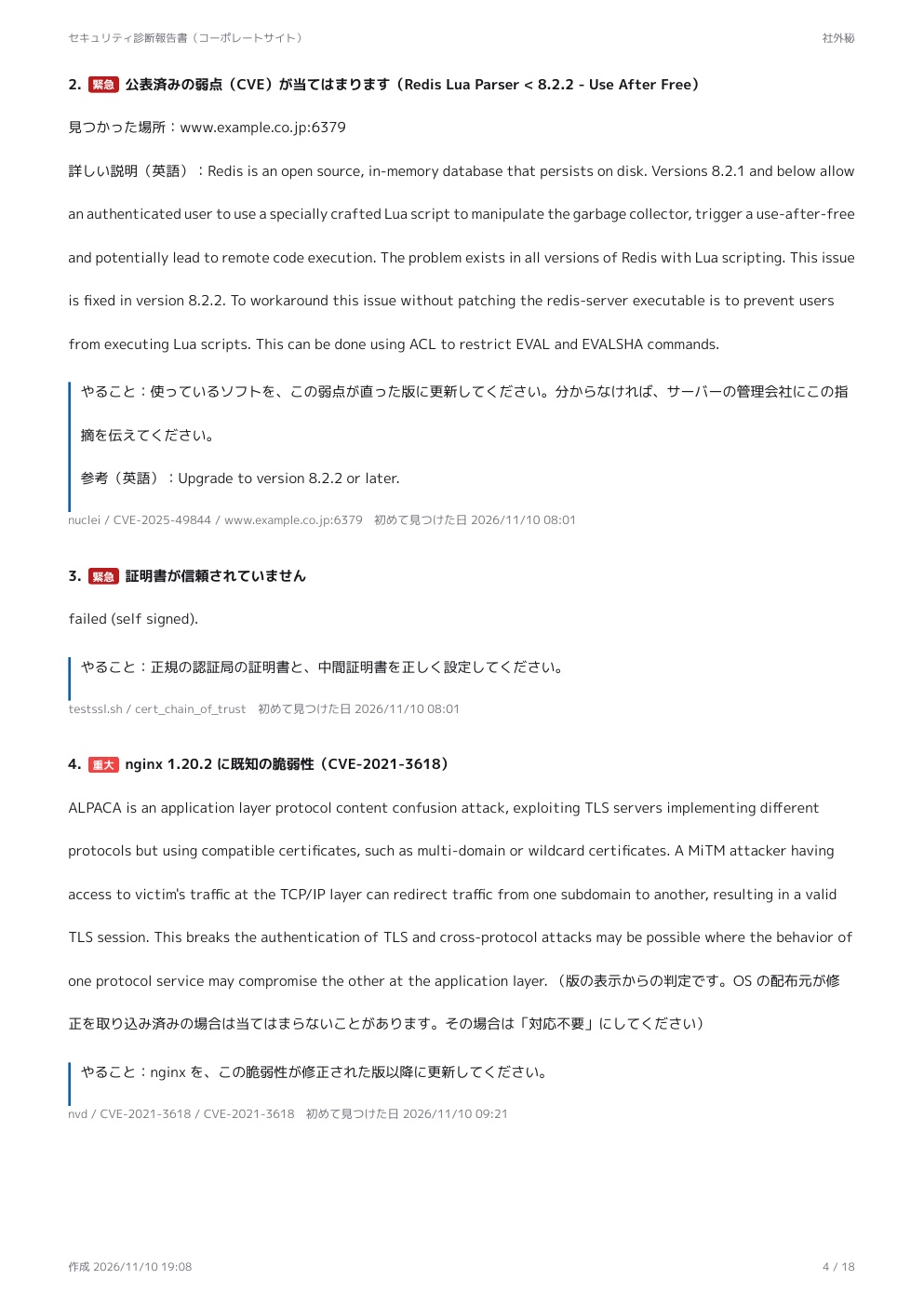
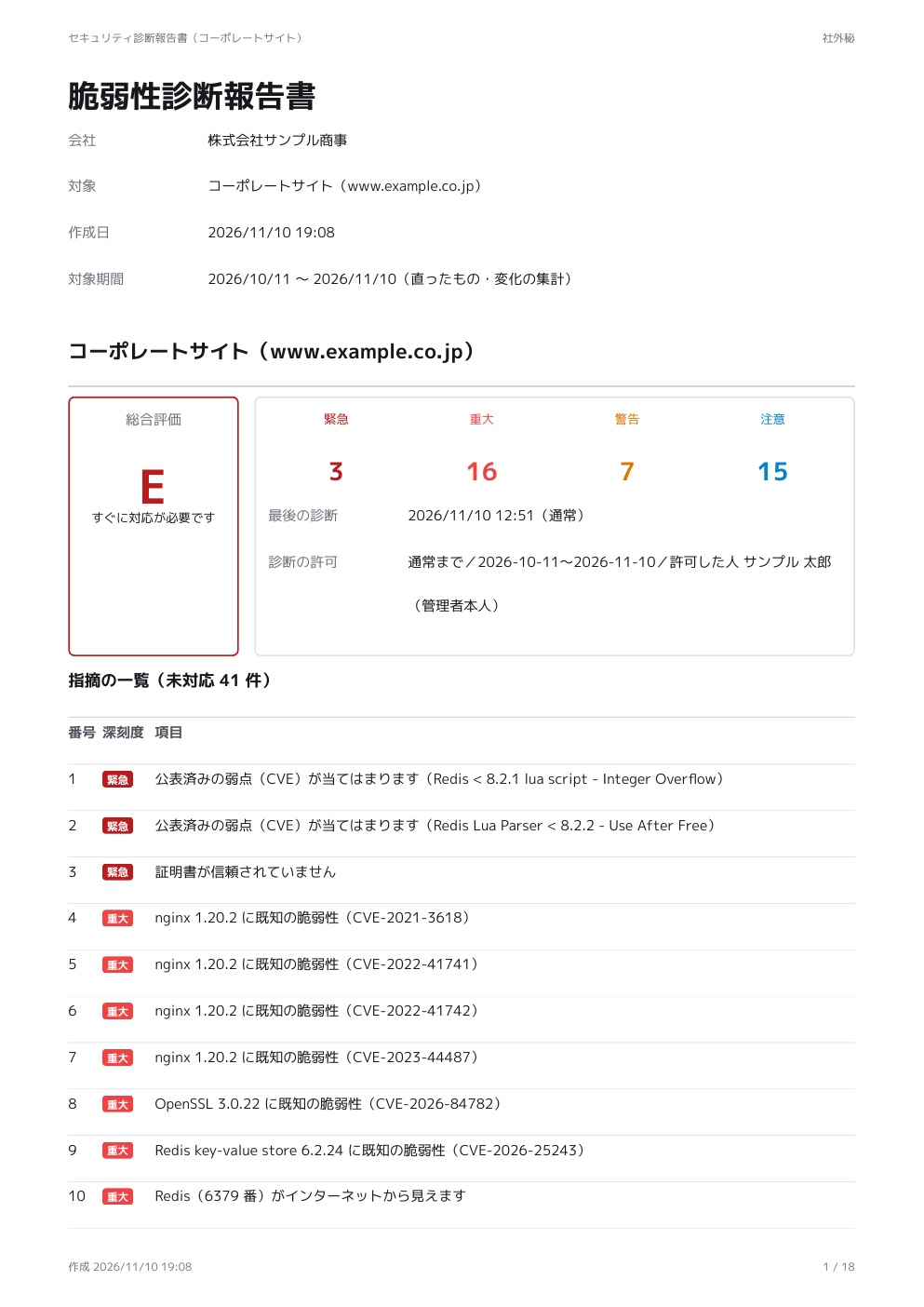 See all 18 pages (PDF, Japanese)
Safety
Making sure a scan never becomes an attack
Done carelessly, vulnerability scanning looks just like an attack. Checking permission is at the core of how Security Ready works.
🛡️ We never scan without permission
We only scan servers where someone has declared they are the administrator or a legitimate agent, and the permission is on record. We record who declared it, when, and from where, and we check the allowed scope twice: when the scan is requested and right before it runs.
🛡️ No checks that could cause harm
We don't run load tests, try passwords by brute force, or try default passwords.
🛡️ A limit on how fast we send requests
We stay within the requests-per-second limit set in your permission, and we don't run outside the agreed hours.
🛡️ Your information stays private
We don't use testing tools that rely on outside callback servers (such as interactsh), and only the account holder can see the results.
🛡️ Can be stopped instantly
If anyone raises a concern, one button stops all scans.
🛡️ We don't scan internal networks
If a name points to an internal office or home network address, we don't scan it.
Who it's for
Small businesses with their own website or servers
Even without a security person, you'll know what to fix.
Web agencies and maintenance companies that look after clients' servers
Keep each client separate, and hand the reports straight to your clients.
Head offices that want to oversee their group companies
See the number of unfixed problems across the group in one list, while each company's staff see only their own.
What we can and can't do
For most companies, this is solid protection
Most attacks on servers start with "holes visible from the outside": outdated software, settings files published by mistake, databases left open to the internet, and certificates about to expire. Security Ready specializes in watching for these holes, again every time a new vulnerability is published. On the other hand, it can't find the kinds of weak spots that take human thinking to uncover. We tell you honestly what we can't do, too.
✓What Security Ready can find
Software with published vulnerabilities
We judge this from the versions of your web server, programming language, database, CMS and so on. If a version can't be seen from outside, enter your setup and we'll still check it.
Files and pages that should never be public
Settings files (such as .env), source control data (.git), and exposed admin or debug pages.
Dangerous doors open to the internet
Whether things like your database or remote server access can be reached from the outside.
Problems with encryption and certificates
Expired or soon-to-expire certificates (the ID card behind the padlock), and old encryption methods.
Protection against fake emails
Whether SPF and DMARC are set up correctly.
Changes you didn't notice
Newly opened doors (ports), software that was swapped out, and forgotten branches of your web address (subdomains).
!What needs a human tester (Security Ready can't do this)
Flaws specific to your business processes
Loopholes in the rules of that particular system, like "I can see other customers' orders" or "skipping a step lets discounts stack".
Access-right loopholes
For example, a regular member being able to use admin features. A person has to compare what each logged-in user can see.
Full attack testing through input forms
Tests that go through each screen and try attacks such as sending malicious commands through a form (SQL injection). Security Ready only runs standard, pattern-based checks.
The inside of your network, and your source code
Our internal scan checks settings and outdated software inside each server, but your whole office network and reading the program code itself (source code review) are not covered.
Protection against attacks that trick people
Such as training staff on targeted phishing emails, or reviewing your internal rules.
| If your site or server is… | We recommend |
|---|---|
| A site with no login, such as a company profile, recruiting page or blog | Security Ready alone is enough in most cases |
| A site with a contact form or a brochure request form | Security Ready is often enough. If your forms are custom-built, have a human test them at least once |
| Member logins, an online shop or a booking system | Combine a human test (about once a year) with Security Ready in between |
| Business systems for outside users that handle lots of personal data or money | Human testing is essential. Use Security Ready for day-to-day monitoring |
Finding nothing is not a guarantee that there are no vulnerabilities. Every report states how we scanned and what the scan can't cover.
Glossary
No technical knowledge needed
On screen and in reports, we use everyday words wherever we can. Here are the terms that still come up, explained with simple comparisons.
- A weak spot in softwareVulnerability
- A flaw left in a piece of software that someone can abuse. Once found, it gets a number (a CVE) and is made public, and usually a fixed version is released. If you keep running the old version, attackers can use that hole.
- A door into your serverPort
- A server has a separate door for each job. Websites use door 443, email uses door 25, and so on. It is dangerous to leave the door to a database or an admin tool open to the whole internet.
- Walking around and checking the doorsPort scan
- Checking from the outside, one by one, which doors are open. Security Ready only does this during the hours you allow, and never faster than the limit you set.
- Sneaking commands in through a formSQL injection
- An attack that hides database commands inside a contact form or login box, to steal or change data. Testing for it needs a human tester, or the "deeper check" we only run with your written consent.
- A sealed envelope and its ID cardHTTPS and certificates (TLS)
- HTTPS seals the connection between the browser and your server so no one can read it on the way. The certificate is your site's ID card. When it expires, browsers show a warning and customers can't open your site.
- The internet's address bookDNS
- The system that links a name like example.com to your server's actual address (its IP address). If someone changes it without permission, your visitors can be sent to a fake site.
- Settings that stop fake emails in your nameSPF and DMARC
- Settings that let receiving mail servers tell real emails from your company apart from fakes. Gmail and others now require them from companies that send a lot of email.
- A branch of your web addressSubdomain
- Names that branch off your company's domain, like shop.example.com or test.example.com. Old test sites and campaign pages are often left running and forgotten.
- A vulnerability's ID numberCVE
- A worldwide ID number given to each published vulnerability (for example, CVE-2025-12345). With it, you can look up which versions of which software are affected.
- Checking only what changedIncremental scan
- A scan that looks only at what changed since last time and at newly added checks. It puts very little load on your server, so it can run often.
- Free software whose code is publicOpen source
- Software that anyone can inspect and that experts around the world keep improving. Security Ready uses the standard scanning tools that security professionals actually use.
Pricing
Your first scan is free. Decide whether to continue after you see the results
Prices are per server per month (one server = one host name, e.g. www.example.com). There is no setup fee.
Free in-depth scan
For anyone who wants to know where they stand
$0
One time only, no payment details needed
- One scan from the outside (1 server)
- Results on screen and a PDF report
- How to fix each problem found
- Our best guess at your operating system and software, for you to confirm
Lite
For daily monitoring from the outside
$19/ month per server (USD)
Additional servers $9 each
- Light checks from the outside every day (certificates, DNS, headers)
- Weekly scans focused on what changed
- New vulnerabilities checked against your servers twice a day
- Instant email alerts when something is found
- Monthly PDF report
- History of changes, and confirmation of fixes
Standard
For checking inside, not just outside
$39/ month per server (USD)
Additional servers $19 each
- Everything in Lite
- Internal scan: software and update status inside your servers and PCs (Windows and Linux)
- A deeper check once a month (with your written consent)
- Help by email
| What's included | Free in-depth scan | Lite | Standard |
|---|---|---|---|
| Light checks from the outside (certificates, DNS, headers) | Once | Daily | Daily |
| Scans from the outside (ports, encryption, headers, known weak spots) | Once | Weekly | Weekly |
| Matching against newly found vulnerabilities | — | Twice a day | Twice a day |
| Alerts by email and chat | — | ○ | ○ |
| PDF report | One | Monthly | Monthly |
| Internal scan (software, updates and end-of-support inside servers and PCs) | — | — | ○ |
| Deeper check (ZAP) | — | — | Monthly |
| Help by email | — | — | ○ |
- • Prices shown are for your first server. Each additional server is $9 for Lite and $19 for Standard. Example: 3 servers on Lite cost $37 per month. Prices are in US dollars; Japanese consumption tax does not apply to businesses outside Japan.
- • The free in-depth scan also requires you to declare that you are the administrator or an agent with the administrator's permission. We can't scan sites without permission.
- • Human testing (penetration tests) is not included. If you need it, we can introduce you to a specialist firm.
- • Our liability is limited to the total fees you paid in the last 12 months (Terms of Service, Article 11).
Frequently asked questions
Q. How is this different from expensive testing done by people?+
In human testing (a penetration test), experts log in and go through the system screen by screen, looking for loopholes unique to that system, such as "I can see other customers' orders" or "a regular member can use admin features". It typically costs thousands to tens of thousands of US dollars and is done about once a year. Security Ready is automated, so it can't find loopholes like these. Instead, it keeps watch every day, at low cost, for published weak spots, outdated software, misconfigurations and exposed entry points, and tells you within half a day when a new vulnerability affects you. For a company information site, Security Ready alone is usually enough. If you have member logins or an online shop, we recommend combining it with a human test once a year.
Q. How much does vulnerability scanning usually cost?+
Testing done by hand by a security firm's experts typically costs thousands to tens of thousands of US dollars each time. Automated scanning tools often cost hundreds of dollars per month. Because Security Ready focuses on automated scanning from the outside, your first scan is free, and ongoing plans start at USD 19 per server per month.
Q. Can I get a vulnerability scan for free?+
Yes. Your first in-depth scan is free (one server per company). You can decide whether to continue after seeing the results and the report.
Q. Can you check for WordPress vulnerabilities?+
Yes. When we find that a site runs WordPress, we compare the WordPress version with published vulnerabilities and also run checks for known vulnerabilities in plugins and themes. Outdated WordPress and plugins are a common way in for site takeovers and defacement.
Q. How can I tell if my website has been taken over or defaced?+
A simple method that the Japanese police also recommend: search Google for "site:yourdomain" and look for pages you don't recognize. Security Ready does not monitor for defacement itself. Instead, it checks every day from the outside for the weak spots that lead to takeovers and defacement (outdated software, open entry points, files that should be hidden, and so on) and tells you how to close them.
Q. Can you check my email protection against spoofing (SPF and DMARC)?+
Yes. We check from the outside whether the settings that stop fake emails in your name (SPF and DMARC) are in place and not too weak. If something is missing, we show you example settings.
Q. A business partner asked us to prove our security measures (Japan's SCS evaluation scheme)+
More and more companies are being asked by their business partners to explain their security measures, for example under the "Security Measures Evaluation Scheme for Strengthening Supply Chains" (SCS) that Japan's Ministry of Economy, Trade and Industry (METI) and IPA are preparing. Security Ready is not a certification or an official evaluation, but it can create a PDF "document for business partners" that summarizes your measures along the 26 items of ★3 in the scheme. Items our scans can tell, such as outdated software, unfixed vulnerabilities and exposed entry points, are filled in automatically; things like internal rules you fill in as a self-assessment. (More details on our Japanese page about the scheme.)
Q. Does this help small businesses defend against ransomware?+
It helps close the way in. According to Japan's National Police Agency, most ransomware attacks get in through VPN devices or remote desktop that are exposed to the internet. Security Ready finds these exposed entry points and the vulnerabilities that affect them, and alerts you. It does not replace backups or your in-house security measures.
Q. Can I scan another company's site without permission?+
No. Before scanning, you must declare that you are the administrator or an agent with the administrator's permission, and agree that you are responsible for any damage caused by an unauthorized scan. A record of the declaration (who, when and from where) is kept. Government and local-authority domains are not scanned on the basis of a sign-up alone.
Q. Our server received scan traffic we didn't ask for+
We're sorry for the trouble. Please tell us the domain name and the date and time using the contact form at the bottom of this page. We will check and stop the scans immediately. If someone made a false declaration, we will hold that person responsible under our Terms of Service.
Q. Will scanning put load on my server?+
A little, but we keep it small. Day to day we run light scans that look only at what changed, and we cap the number of requests per second. Heavier checks run only during the agreed hours.
Q. If nothing is found, does that mean I'm safe?+
Not necessarily. We use automated tools to check what is visible from the internet, so screens behind a login and flaws specific to how your business processes work are not covered. For important systems, we recommend also having experts test them.
Q. Do I need to install anything on my server?+
No. We check from the outside. No DNS changes are needed either.
Q. What if my software versions can't be seen from the outside?+
On each server's page, you can enter your operating system, database, libraries and their versions. We use what you enter to find vulnerabilities that apply to you.
Q. What do the reports look like?+
You can view them on screen or download them as A4 PDFs. They include an overall grade (A to E), the list of findings, what to do, and how we scanned and what the scan can't cover.
Talk to us
You can also request your free in-depth scan here. Tell us roughly how many servers you have, and we'll show you how to get started.
For terms of use, please see our Terms of Service.